9. Tips
9.1 Listing the abbreviations used in a table as a footnote
If you want to write, in a figure or table footnote, the correspondence between the abbreviations used in that table and their terms, combine loading a selection with pasting into the body.
- Select the target table and extract the abbreviations within it with "Load selection" from the [Load] menu (do not select "Skip tables," so that the table is not excluded).
- In the grid, check and select the abbreviations you want to write in the footnote.
- Place the cursor at the table footnote (where you want to write it) and open the "Paste items" dialog from [Paste].
- Specify the columns to paste (abbreviation, English term, Japanese term) and the column delimiter, then insert; the selected abbreviations and terms are written into the footnote (4.6).
9.2 QC of the abbreviation table (dictionary comparison)
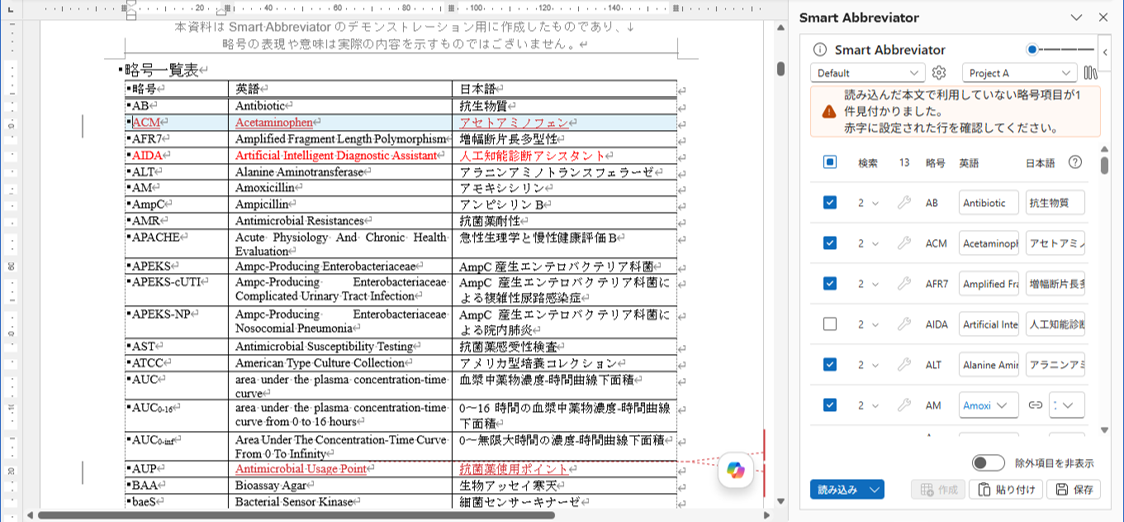
You can inspect (QC) whether an existing abbreviation table is consistent with the abbreviation dictionary.
- Apply the rules to which the abbreviation dictionary for comparison is tied.
- With the existing abbreviation table selected, choose "QC selected table" from the [Load] menu.
- Items that do not match the dictionary are shown distinctly.
9.3 About the listing order of abbreviations
The sort order of the abbreviation table is determined by the following criteria (a multi-key sort):
- First key: The first alphabetic letter that appears (Greek letters are converted to the corresponding Latin letter; e.g., Δ → D).
- Second key: A comparison of the string with only the alphabetic letters extracted (Greek letters converted to Latin).
- Third key: Numeric values in the string compared as numbers (e.g.,
AUC0-8comes beforeAUC0-24).